Problem
Phones already have great cameras and screens, but running live computer vision on what a phone sees usually means building a custom mobile app. EdgeVision explores a lighter route for edge-AI work: stream the phone’s screen to a PC and run detection there in real time — useful for surveillance prototypes, monitoring and edge-AI research.
What I built
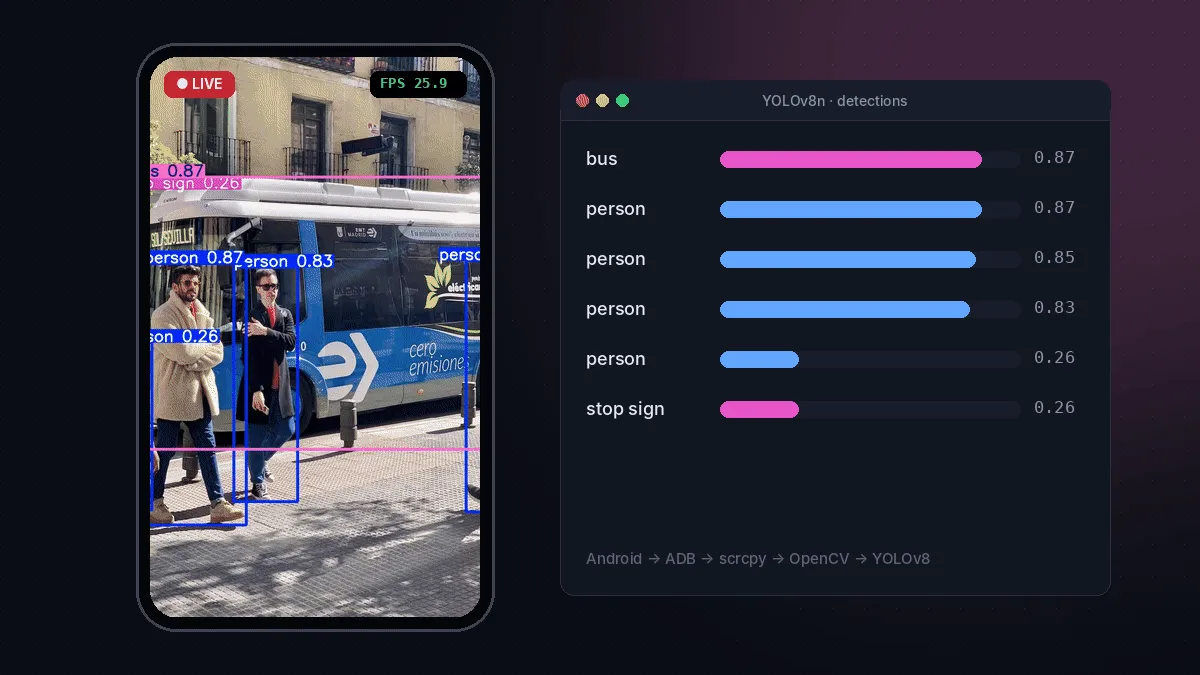
A real-time pipeline that mirrors an Android device’s screen over USB and runs object detection on every frame.
- Android screen streaming via ADB and scrcpy, with automatic detection and tracking of the scrcpy window.
- Region-based frame capture with MSS and OpenCV to reduce processing load.
- YOLOv8n inference with live bounding boxes and an FPS overlay for benchmarking.
Architecture
Android device → USB debugging (ADB) → scrcpy stream → Python frame capture → YOLOv8 inference → live detection output.
Status
- Working today: dynamic window tracking (only the target window is captured), region-based capture, the lightweight YOLOv8n model and a real-time FPS overlay for benchmarking.
- Next: threaded and asynchronous inference, CUDA acceleration, TensorRT model compression, multi-object tracking, OCR and a FastAPI + WebSocket browser dashboard.
Tech stack
- Vision: Ultralytics YOLOv8, OpenCV, NumPy
- Capture: scrcpy, ADB, MSS, PyGetWindow
- Language: Python